RED Epic and Scarlet Unleashed

RED Digital Cinema has done it again. Several years ago the California based camera manufacturer faced much skepticism after they had announced the RED ONE digital film camera. The camera touted such advanced specifications that no one believed the unknown company could pull it off. In the end they pulled it off.

Specifications for RED Digital Cinema’s Epic and Scarlet, the two new camera systems have been announced this week. The projected abilities are beyond what any other manufacturer can match at this time. By any measure there should be a wave of skepticism again but no one is questioning whether or not RED Digital Cinema can pull it off this time.

Epic and Scarlet are a part of RED’s new Digital Stills and Motion Camera (DSMC) system. The two cameras are not like any cameras we have seen so far. The units are highly configurable which means that different pieces can be mixed and matched to answer specific needs of a production, rental facility or an individual photographer or cinematographer.

Yes, “photographer” is correct. Epic and Scarlet can be configured in to work as high end digital still cameras. The Epic 617 option with new Monstro sensor comes at an astounding 28k resolution (28000×9334) pixels.

Speaking of sensors and sizes, RED is introducing the all new Mysterium-X and Monstro imaging sensors which come at a range of sizes and resolutions starting at 3k and going all the way up to 28k.

The sensors are part of the camera “brain” which is a self contained module that can be configured with lens mount, remote control, power and recording options. The announced prices for RED Epic and Scarlet camera brains range from $2,500 to $55,000.

The body of the camera can literally be custom built using available options. Judging by the fact that the existing RED ONE camera has been embraced by third party manufacturers it is reasonably to expect that the available body options and accessories will not be limited to the offering announced by RED.

These options currently include a handle grip, lens mounts, video viewfinders, recording modules, batteries, I/O modules and a remote control.

The small form factor of Epic and Scarlet makes them ideal for use in stereoscopic photography and RED has already announced an ergonomically deigned stereoscopic rig for use with these cameras.

The estimated street dates for various Epic and Scarlet options are from spring to winter 2009.

Igor Ridanovic is a co-founder of RED Los Angeles User Group

Avid Demonstrates Support for RED Camera

Updated on March 7, 2009

Avid support for RED is now available to customers.

Avid has demonstrated the much anticipated support for RED camera files at a gathering at Hollywood Roosevelt hotel on November 5th. Avid’s Michael Phillips walked a group editors through a full RED workflow from Media Composer to Avid DS.

The core of the presentation focused on the existing Avid workflow documented at Avid.com/red. Although this process is fully operational and flexible in terms of available workflow options, it depends on multiple steps through third party applications.

Towards the end of the gathering Michael presented the Avid/RED technology demo that everyone has been eagerly awaiting. The Avid support for RED is still in development and the shipping date has not been announced.

What’s New in the Avid RED workflow?

Although there are RED projects that have been fully finished using Avid tools and existing workflows  the new Avid RED workflow greatly simplifies the necessary steps. In order to understand it we need to take a brief look at how the current support for RED in Media Composer and Avid DS work.

All existing solutions revolve around bridging the Media Composer’s inability to read time code from Quicktime files. While it is possible to edit in Media Composer using the RED proxy Quicktime files (or DNxHD wrapped inside Quicktime), the difficulty lies with translating the final sequence into an Edit Decision List or other type of file that a DI workstation can understand. No time code on the input means no time code on the output.

MetaCheater or REDrushes can output Avid ALE files which contain time code and other metadata needed for offline edit.

Once the cut is locked the RED .R3D files must be converted to DPX files for conform and color timing in Avid DS. This is can be achieved through REDcine or REDline using a handful of other applications such as Crimson, CineXML, or Monkey Extract. All of them work as translators from one application to another.

In the nutshell this workflow does the job but it’s not as straightforward as finishing most other file based sources. A much simpler Avid RED workflow is currently in development. It is divided in two parts. The first part focuses on offline editing and the second part focuses on DI or tape finishing.

Avid RED Offline Editing

In preparation for RED editing in Media Composer, the RED .R3D files are converted to DNxHD MXF media using Avid MetaFuze. The process is simple and similar to the existing workflow using DPX film scans.

Avid MetaFuze MXF files take into consideration color metadata settings dialed into the camera at the time of the shoot. The color rendered into the MXF media reflects the cinematographer’s choice.

Avid MetaFuze supports LUTs for work in color managed environments and can burn in time code making it a good choice for preparation of dailies.

CPU scalability is an added advantage. Avid MetaFuze is multithreaded and supports remote CPUs. This opens the doors for distributed network rendering which will become an important part of any future RED workflow due to intense debayering computation requirements.

The Avid MetaFuze conversions can be done on a daily basis if the production requires on-set editing or can be done in one batch at the end of principal photography.

The DNxHD encoded MXF media is imported to Avid Media Composer and edited as any other film based project.

Once the picture is locked the editor can create AFE files of the locked sequences for export to Avid DS.

Avid DS RED Digital Intermediate

While Avid technology preview did not include an entire step-by-step demonstration of the new Avid DS RED importer it certainly suggested what the process may look like in the near future.

The RED conform in Avid DS will resemble the file based conform via AFE introduced in version 10. A Media Composer AFE will create clips that link to the the original RED .R3D files.

The Avid DS RED importer will allow the full range of RED based adjustments like the parameters in REDcine or REDrushes. Color temperature, ISO speed, OLPF processing, curve adjustments, etc. will all be available in the new importer along with an option to use the .RSX color metadata from REDalert.

At present time any DNxHD MXF files from Media Composer can be linked and shared in an Avid DS sequence. Although the visual quality of these files may be insufficient for final delivery, they offer a picture reference for cross checking of the conform accuracy. This functionality could be used in a RED based DI in place of a typical Quicktime picture reference.

Avid DS has the ability to export finished sequences as 10-bit log DPX files for film output or can record to SD and HD tape formats including 4:4:4 HDCAM SR.

The Advantages of Avid RED Workflow

The new Avid RED workflow will give an opportunity to editors to work in a familiar environment without having to learn the intricacies of XLM file structure, third party tools and multiple step workflows.

The Media Composers unmatched ability to track all kinds of metadata and it’s connectivity with Avid DS via Avid’s AFE file format is a step ahead from the typical EDL based transfer between offline edit systems and DI workstations. This will allow facilities to work faster having to rebuild fewer effects and timeline tracks.

Igor Ridanovic is a co-founder of RED Los Angeles User Group

RED Support: Native vs. Direct R3D Support

Updated April 29, 2009

Native support for REDCODE, the RED ONE camera’s RAW image format is a subject of considerable interest in the post production community.

We’ll take a look at the implications of the native and non-native RED support.

RAW image file format is a straight data dump from the camera’s imaging sensor. RED ONE camera uses a Bayer pattern color filter array. Each Photosite (pixel) in Bayer pattern is sensitive to either one of the tree primary colors. Pixels are arranged in an alternating pattern designed to optimize true color stimulus. Since each pixel represents only red, green or blue the image must be debayered before use.

While a RAW image resembles the photographic subject, it is far from being usable prior to debayering. Good quality digital still cameras are similar to RED ONE in the way RAW image is acquired and presented for post-RAW processing.

Debayering is only one of the steps in the process of converting an image from RAW to a viewable picture. Other steps may include OLPF (Optical Low Pass Filter) processing, bit depth conversion, gamma encoding, and various types of color processing. The actual steps depend on the manufacturer and are often closely guarded secrets.

Some manufacturers allow third party processing of their RAW images while others don’t. RED Digital Cinema’s REDCODE is an encrypted format closed to direct third party processing. This distinction is important in order to understand the native vs. non-native RED support.

Native RED Support

Initially Assimilate’s Scratch and ScratchCine were the only third party products with native RED support. Adobe was the second company to partner with RED Digital Cinema and gain direct access to REDCODE in Premiere and After Effects. After NAB 2009 DVS Clipster is the newest third party box with direct RED support.

Native support means that Scratch and all other “native” systems are able to work directly with the RAW data contained in .R3D files. No conversion stands between these systems and the data captured by the RED ONE camera’s imager. The data is processed with an internal debayering algorithm.

There is a very important concept to consider when it comes to RAW image processing in RED ONE. The only two controls that alter the way image is captured are the lens aperture and the frame rate. All other settings such as ISO speed, color temperature, etc. have no effect on RAW data whatsoever. They are merely suggestions to the debayering algorithm on how to process the image.

This is a counterintuitive concept to those of us who come from the world of film where the choice of tungsten or daylight film determines color rendition. CMOS imaging sensors are color temperature agnostic (not entirely true but that’s a topic for a whole another discussion).

Film stocks rated for higher ISO speeds differ in chemical formulation from lower ISO speed stocks. High speed setting in a digital camera like RED ONE can not magically make the CMOS sensor more or less sensitive to light. The sensor’s sensitivity is what it is. Higher ISO speed dialed into the camera does not make it more light sensitive. It only tells the debayering process to “push” the processing a certain amount.

A post production tool like Scratch can access this unprocessed data and it is up to it to push, pull, alter color temperature or do any other needed adjustments. The “native” comes from the fact that the image is accessed by the DI system in its native RAW form. Theoretically, this full access can allow a RED native tool a wider range of adjustment than possible when RAW images are converted to an intermediate step as in a non-native process.

Non-native (Direct) RED Support

Almost all DI manufacturers offer non-native RED support in their products since NAB 2009. These manufactures prefer to refer to the implementation as “native RED support” although the process is entirely different from the true native approach as described above.

The non-native direct RED support renders remarkably high image quality and when processed properly by the colorist there is no loss of image data.

This process does not have direct access to the REDCODE RAW material. Images are debayered through RED Digital Cinema supplied SDK (Software Development Kit) and converted to another image format for storage and color manipulation by the host digital intermediate system.

For example, Digital Vision’s Film Master processes all images to 10-bit or higher DPX log or TIFF file format prior to color processing. All RED specific processing such as color temperature, ISO speed, etc. is completed during this initial step. Once the DPX files are created all these color decisions are hard wired into the files. An .R3D file can be reimported with updated settings at any time.

Practical Differences

There is an advantage to having a direct access to RAW data as in Scratch because of inherent benefits of color processing during debayering stage. Significant color changes during debayering typically produce fewer artifacts.

One drawback of non-native direct RED support through the SDK is that it is difficult to achieve real time playback speed due to the SDK debayering step.

The real world difference between the native and non-native direct RED support is non-existent or minimal in most practical situations but there is a potential for faster operation in native environments when heavy color changes need to be performed during client supervised sessions.

Igor Ridanovic is a co-founder of RED Los Angeles User Group
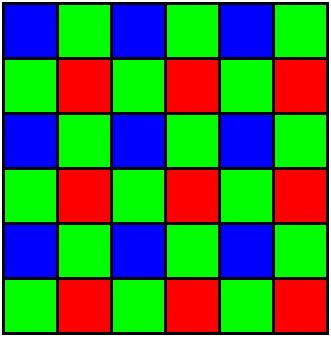
Demosaicing or Debayering

A process of “developing” pictures from RAW image sensor.

Demosaicing is also known as Debayering. It is a process in which viewable images are created using RAW data from a camera CMOS sensor. Photosites or light sensitive units (pixels) in a color filter array are typically arranged in Bayer pattern [Fig.1].

Because each photosite can be sensitive to only one of primary colors, the red, green and blue elements are interspersed in an alternating pattern which contains 50% green, 25% red and 25% blue pixels.

RAW images do not look correct to the eye and need to be processed before use. This process is known as demosaicing. During demosaicing full RGB values for each pixel are determined using various interpolation algorithms. There is a trade off between the speed and the quality of debayering. Photosites are sensitive to linear light. The linear values are gamma corrected to achive a tonal distribution acceptable to human eye during debayering or as a separate last step, and sometimes both.

This process takes place inside consumer cameras and is transparent to the photographer. Higher end still cameras and digital film cameras like RED ONE allow some level of user control over the demosaicing settings.

Bayer CFA pattern

Fig. 1