Crossconversions

Crossing from one HD standard to another.

Conversions from one HD standard to another are commonly referred to as “crossconversions.” In strict technical terms crossconversions from a smaller standard to a larger one should be considered upconversions while crossconversions to a smaller standard should be considered downconversions.

For example, transferring 720p camera masters to 1080i is a crossconversion. Since you are also enlarging the video raster it is an upconversion.

International HD Standards

Not the same as in the U.S.

You thought that with the advent of HD the ages old NTSC vs. PAL duel was put behind us? Tough luck. Different regions of the world have adopted varying frame size and frame rate standards.

In U.S. alone two standards have been adopted by broadcasters – 1080 59.94i and 720 59.94p. Several more standards are available for acquisition only.

E.U. countries have adopted 1080 50i and 1080 25p standards. Some countries are still in process of selecting a standard.

The multitude of frame rates in use around the world is a part of SD television legacy. If everyone used the same frame rate the standard conversion process would be as simple as reducing or enlarging frame size which is a straightforward process. Unfortunately, the existence of multiple frame rates makes it important to consider overseas delivery ahead of time. Certain types of HD crossconversions will look great while others may suffer from same artifacts that plague SD standard conversions.

YCbCr. What is It?

Way of storing images.

YCbCr is a component color space used by most digital video tape recorders to record video to tape. Unlike the RGB model, YCbCr breaks the visual information into black and white (luma) signal and two color components.

Practical implementations of YCbCr take into account that human eye is less sensitive to color stimulus than black and white stimulus reduce the amount of information contained by color components.

For example, D5 VTR utilizes 4:2:2 color subsampling which means there is only half as much color information as black and white information.

YCbCr is a color space related but not equivalent to YUV color space.

Tri-level Sync

Synchronizing signal for HD equipment.

Similar to black burst in standard definition equipment, tri-level sync is the signal which provides heartbeat to high definition equipment. The purpose of the signal is to synchronize various pieces of video and audio equipment so they may work in concert with each other.

Tri-level sync is generated by a sync generator and distributed to various pieces of equipment throughout the facility. It is necessary to provide proper tri-level sync for each of HD standards. For example a single signal can not be fed to both equipment working in 1080 59.94i and 720 59.94p standards.

In certain situations it is possible to use the old fashioned black burst in place of tri-level sync.

TV Size and HD

You may not see much difference on a small size screen.

Have you ever wandered what’s the big deal about expensive digital cameras because your cheap point-and-shoot camera produces the same quality photos when viewed in an email attachment? If all you’re going to do is email small size photos, a cheap camera will do a decent job. However, if you decide to do an 8×10 enlargement of the same image you will see many shortcomings when compared to a 6 megapixel camera.

The exact same “science” applies to high def. When you compare SD originated image to HD image on a small size monitor you may not be able to appreciate the amount of information contained within the HD signal. The difference becomes more noticeable with increase in TV size. At about 28″ diagonal most people will react favorably to HD.

TV manufacturers have responded to the trend of larger screen size which has been particularly accelerated by the drop in prices of large screen LCD monitors and TVs. Average TV screen size in the U.S. is 38″.

RGB. What is It?

Way of storing images.

RGB stands for Red, Green and Blue. The acronym can mean many thing but in context of high and standard definition television it almost exclusively addresses image storage and processing in digital format.

Storing images using the color primaries is as old as color photography and can be emulated digitally. In digital realm RGB takes advantage of a physical phenomenon called additive mixing. When color primaries such as red, green and blue are added in equal amounts white light is created. The white color coming off your computer screen is really a mixture of red, green and blue which can be easily verified with a magnifying glass. Varying the percentages of the three primaries creates other hues and values.

RGB is just one of color models used in TV and photographic imaging.

Quality of Broadcast HD Signal

Varies from channel to channel.

DTV Broadcasters can use their own discretion when determining how much bandwidth to allocate to any given channel. Overall bandwidths are regulated and can not be exceeded. Cable, satellite operators and terrestrial broadcasters may decide how to apportion those set ranges themselves. HDTV signal also must share the limited room with standard definition broadcasts.

Too many channels squeezed into a limited amount of broadcast spectrum will reduce the picture quality. To remedy the problem broadcasters may allocate more bandwidth to certain channels and less to those channels which do not require much room. For example, a fast paced action movie channel may require lots of room in order render artifact free video. A local information text only channel may require very little bandwidth.

Non-integer Frame Rates

Just the way it is.

Why would anyone want NTSC video to run at 29.97 frames per second? What about HD video running not at 24 frames per second but at 23.98 frames per second?

It wasn’t intended that way. Before introduction of NTSC color North American television ran at true 30fps. The addition of color had to overcome a significant obstacle. No black and white TVs were to be left in the dark. The new color system had to be backwards compatible with the old black and white system.

This posed a significant challenge. For a set of very specific reasons that have to do with physics of radio transmission the frame rate of television had to be slowed down a minute amount to 29.97fps.

HDTV radio transmission is not bound by the same constraints that once necessitated slowing down of standard definition television rate. HD in North America runs at either 23.98fps, 29.97fps (also known as 59.94i) or 59.94fps for another reason.

HD non-integer frame rates have been devised in order to accommodate easy downconversion to SD. Downconverting from 30fps to 29.97fps is a tough proposition. It makes perfect sense for HD to run at either 24fps, 30fps or 60fps but as long as there is a need to downconvert to SD or use legacy video equipment integer frame rates are not going to be feasible.

MXF File Format

Watch for incompatibility between platforms.

Material Exchange Format (MXF) is a digital video and audio container format. Manufacturers like Sony, Avid, Apple and Panasonic use MXF format for media recording. Although MXF was designed to provide maximum compatibility between different platforms different manufacturers have implemented the format in various ways causing a lack of compatibility.

The key word is “container” format. An MXF container will be read by any device that supports MXF but it may not necessarily know what to do with the contents. If attempting to use MXF between platforms of different manufacturers as a part of your workflow make sure you conduct tests before starting the job.

Keykode, What is It?

Film timecode and more.

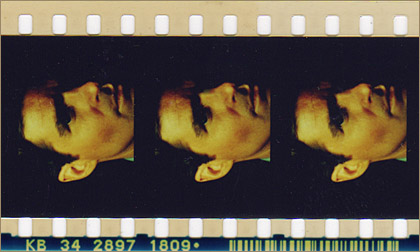
Keykode (not keycode) is an addressing system for motion picture film. It is recorded as barcode on the edge of the film. It contains the film manufacturer ID, batch and roll number and footage counter.

Keykode allows precise location of any frame of film for purposes of negative cutting, scanning or telecine transfer. Keykode metadata is typically stored in digital film scans so every frame of film can be traced back to the negative. Telecine transfer to tape can also generate files which link the newly created tapes to their respective film negatives.


keykode explained

Fig. 1. Keykode is Printed Along the Edge of the Film