Repurposing Library Material?

In some cases you can, and in some cases you can not.

Many producers have access to library material or in-house stock shots that can be repurposed for new shows. Most of legacy material is in standard definition and this poses a question whether such material is suitable for use in a high definition show.

In most cases you can upconvert and use SD stock shots. They will appear significantly softer than native HD material but this negative impact can be drastically reduced through judicious editing.

It is difficult to use SD clips shot on video in 1080 23.98p shows. Unless the stock footage originated as a 24p material such as film, it is difficult to avoid motion artifacts when changing the frame rate from 29.97 to 23.98.

Lastly, your network may have the final word if upconversions from SD are acceptable.
Can I Shoot DigiBeta and Upconvert?

Do it at your own risk.

Upconversion is a process of resizing and sometimes changing the frame rate of source SD footage in order to make it playable in HD.

Shooting Digital Betacam is certainly cheaper than shooting HD. But you get what you pay for. Upconversions can sometimes full a casual observer but when placed next to footage shot natively in HD the difference will be obvious. There are times when you must upconvert archival elements that exist only in SD. At other times specialty SD cameras such as “helmet-cams” may be necessary. Networks typically have a provision for this but they frown at upconversions done to save production costs.

If you decide to shoot SD 100% finish your show in SD and only upconvert the final color corrected master. If your budget allows do the titling in HD for much crisper graphics.

Examine your spec sheet first to understand the allowed percentage of upconverted material in a finished show. When booking an upconversion explain to the facility representative what type of material you’re upconverting so they can recommend the best process.

Can I Shoot 720p and Deliver 1080i or 1080p?

Yes, but check with your network first.

Budgetary requirements may necessitate that you complete production and post production in a smaller size standard like 720p and upconvert the final delivery to 1080i or 1080p.

This can be accomplished. You can even shoot standard def and deliver high definition master but as with any upconversion there is a price to pay in terms of quality.

While most viewers will not spot the difference between a show originated in 1080 23.98p and a show shot in 720 59.94p with Varicam your network may have very specific guidelines defining the acceptable percentage of a show that is allowed to be upconverted.

AAF, AFE, OMFI?

File formats for exchange between platforms.

These formats facilitate migration of projects between different editing platforms. They are commonly used for bringing a project over from an offline NLE to an online NLE.

AAF, AFE and OMFI contain additional information EDLs are not capable of storing such as multiple video layers, titles and effects.

AAF – Advanced Authoring Format

AFE – Avid File Exchange

OMFI – Open Media Framework Interchange Format

What is 24p?

Universal mastering frame rate.

24p where “p” stands for “progressive” is a universal mastering frame rate which allows easy conversion to other frame rates used around the world. Motion picture film has used the 24p approach for years. Video suffers from multitude of standards used in different countries (sometimes in a single country) so creating a master that will convert well into other standards is of great importance.

It is always possible to make standards conversions but they may come with a quality loss. The frame rate is not the only property that determines how a master will convert but it is arguably the most important one. Masters created at 24p (or more often 23.98p) are appropriate for versioning to any existing standard with the least amount of quality loss.


It is also important to consider the difference between 24p and 23.98p (more precisely 23.976p). True 24p HD is rarely used in the United States.

3:2 (2:3) Pulldown in HD

Used in the United States for film to tape transfers

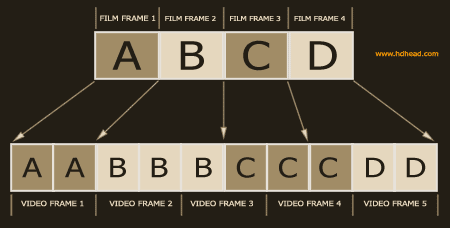
Also known as 2:3 pulldown this process makes it possible to transfer 24fps film to 30fps videotape (really 29.97 but that’s another discussion). The goal is achieved by holding longer an extra field every other frame of video [Fig. 1].

3:2 pulldown is alive and well in 1080 59.94i HD standard. It works exactly the same way as in SD video. Anything that was originally shot in 24fps film or 23.98p HD and transferred to 1080 59.94i will consequently have 3:2 pulldown.

720 59.94p HD standard also uses a similar method to 3:2 pulldown to achieve a 24fps look on tape when shot with Varicam.

See also advanced pulldown.


3:2 pulldown explained

Fig. 1. 2:3 Pulldown — From Film to Video Tape

Advanced Pulldown 24pA

A variation on standard pulldown

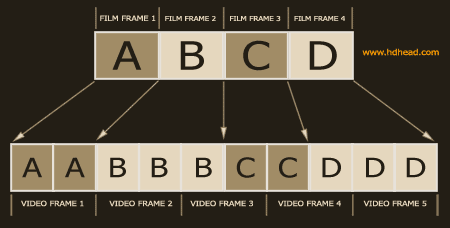
The standard 3:2 pulldown is a means of converting 24 fps film to 30fps videotape. It is achieved by holding every other field of video. The field cadence of standard pulldown is 2:3:2:3.

The cadence of advanced pulldown is 2:3:3:2. It was designed to be less computationally intensive when restoring the material back to 24fps (inverse telecine). NLEs that support advanced pulldown have an easier job than those which don’t. When restoring the material back to the original progressive video the “BC” video frame is ignored by the NLE [Fig. 1].

It is important to consider whether advanced pulldown will work throughout your entire 23.98p workflow before deciding to shoot with this option. Projects finished in 29.97 fps will generally not be affected by the choice of either standard but mixing and matching the two methods in the same timeline may introduce artifacts.


advanced pulldown explained

Fig. 1. Advanced Pulldown

EBU

European Broadcasting Union.

EBU is an professional organization of European broadcasters and beyond. One of the concerns of EBU is development of television recommendations.

http://www.ebu.ch/

DVB

An organization that establishes international DTV standards.

Digital Video Broadcasting (DVB) is an international consortium that proposes international digital television standards and promotes digital television.

http://www.dvb.org/

DCI

A body providing D-cinema standards recommendations.

DCI (Digital Cinema Initiatives) is a consortium of major Hollywood studios gathered around a common goal of providing specifications for D-cinema. The goal of the organization is to standardize tools and processes used for digital film distribution.

http://www.dcimovies.com/