SD Downconversions for Offline Edit

Not necessary, but recommended.

Let’s say you have 35mm film negative transferred to D5 and you’re finishing your film in HD. Should you make SD downconversions of your dailies? If you have a D5 video tape recorder (VTR) sitting in your office you don’t have to. Of course, it is helpful to have SD tapes so you can make additional dubs without having to use your master tapes.

You can digitize a downconverted video straight from an HD VTR into Final Cut Pro or an Avid. Certain procedure must be followed when using this approach. Failing to do so may compromise timecode tracking and render your offline useless for final offline purposes. The procedures depend on the type of VTR, the NLE you are using and the frame rate of the project you’re creating.


Safe Title in HD?

Wider than SD but beware.

Safe title is the area recommended for title and essential information placement in the frame. Anything too close to frame edges may get covered by the TV set cabinet body or lost due to other reasons.

Because of 16:9 aspect ratio the safe title area in HD is wider. However, titles placed at the edge of the HD safe title area will get cropped off by “center crop” downconversion to standard definition video [Fig. 1].

It is wise to consider the 4:3 safe title when titling HD material. You can download safe title charts here:

1080 safe title chart, jpg format

1080 safe title char, tif format with alpha

720 safe title chart, jpg format

720 safe title char, tif format with alpha


hi def safe title


4x3 protect

Fig. 1. Unprotected Title is Cropped Off in SD 4×3 Center Extraction


Rendering CGI in HD

Slower than SD. No Joke.

It takes longer to render CGI material in high def. If you’re growing impatient waiting for your revised shots bear in mind that the size of 1080 format frame is close to the size of 2k film. HD frame is significantly larger than SD frame.

Frame rate also needs to be considered. Rendering 1080 59.94i takes longer than 1080 23.98p because of the frame rate difference. One format runs at roughly 30fps while the other runs close to 24fps. 6 extra frames can add up!

Any non-linear editing systems that offer real time HD capabilities are a real asset if you’re going to be supervising a session.

Pan and Scan

Operator assisted process in telecine or downconversion.

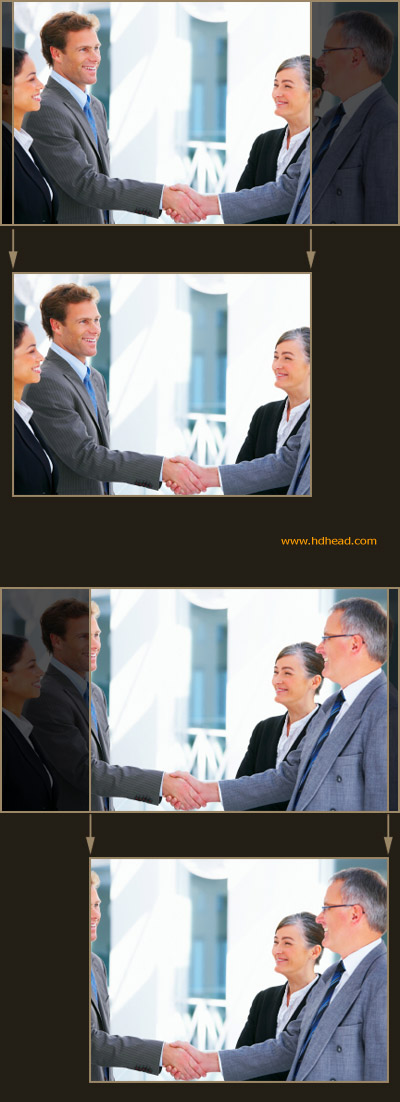
Widescreen material poses a challenge when 4:3 full frame delivery is required. Sometimes important action will take place off to the side of the frame and a simple center crop will either produce a poor composition or will entirely crop out the action.

Pan and scan is a process where a 4:3 area is extracted from the original widescreen material. The crop is not locked in the center of the screen. The operator has the ability to move the crop area left and right so no important action is excluded from the frame [Fig. 1]. This type of downconversion is the best option for 4:3 full frame deliveries but it is time consuming and can be costly.


pan and scan

Fig. 1. Pan and Scan to Reveal the Frame Right Action

Offline Edit in HD

You don’t have to edit in HD resolution.

You don’t have to edit in 23.98p either if this is what you used to shoot your material. Working in full HD resolution would unnecessarily burden your system and your storage. It is safe to work with SD downconversions in 29.97 as long as they are properly made.

Various online NLEs have different ways of accommodating the transfer of your project from SD to HD so check with your post production facility first to find out what they will need in order to finish your project.

In most cases it is the best to use offline and online systems by the same manufacturer i.e. Avid Media Composer for offline and Avid DS Nitris for online but it is not a hard rule.

Does it Take More Time to Edit HD Than SD?

It shouldn’t. Yes, it always does.

Offline and online editing HD should closely resemble regular video editing or film editing in case of 23.98p production. HD may take longer. A typical HD production for TV or cable will use multiple tape formats and multiple frame rates. Also, since you’re dealing with a larger image it will take longer to render effects. This is the area where a very fast high end editing/compositing box outperforms less expensive NLEs.

In some cases the amount of time needed for HD editing can be comparable to the SD counterpart.

Mixing and Matching Formats

No you can’t mix and match. But you have to. Get an expert advice before you start.

Let’s say you are doing a documentary that was 80% shot on HDCAM at 1080 23.98p. But then you also have some Digital Betacam interviews and the film distributor has given you their logo on DVCPRO HD tape at 720 59.94p.

How do you combine all this? Many people don’t consider that there may be a difficulty in doing so. Unfortunately, there is no one solution that fits all cases. Fortunately, it is done all the time.

Mixing different tape formats can be problematic because of different frame-per-second (fps) rates. Just because it is possible to capture all these into an offline edit system it does not mean it will be equally easy to do the final HD conform.

There are too many possible cases to consider and each can be unique in its own right. Before you embark on using formats of different frame rates talk to someone experienced in HD workflows.

Judder in 23.98p HD

Same as film.

Also known as temporal aliasing. Similar rules that warn against pans of specific speeds in 24 frames per second film production apply to 23.98p (and 24p).

An experienced cinematographer is your best resource to avoiding judder in 23.98p production.

Inverse Telecine

Restoring material back to 24 frames per second. The exact opposite of 3:2 pulldown.

The nomenclature varies from manufacturer to manufacturer. You may see terms like “3:2 Contract”, “Remove Pulldown”, “Cine Compress”, etc. The effect is the same.

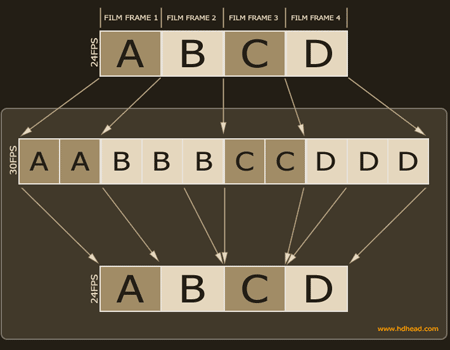
Any material that originated in 24 frames per second (film) or 23.98 frames per second (HD video cameras) has 3:2 pulldown applied to it when transferred to video tape that runs at 29.97fps.

If you want to edit the material in 24p (film workflow) or 23.98p (HD workflow) you need to restore the original progressive frames cadence by removing the 3:2 pulldown. This is the goal of inverse telecine.

In most cases the process takes place during the capture into the NLE but can also take place after the material is already captured.


inverse telecine explained

Fig. 1. Inverse Telecine

Illegal Video Levels

Will get your master rejected.

Network QC departments can be very picky when it comes to proper levels. In the soon-to-be-old days of analog broadcast illegal NTSC level could adversely affect transmitter operation and theoretically cause a transmitter shutdown. There are few such perils in the digital world but networks still request finished masters to abide to specific level requirements.

It is important to note that levels straight out of camera are typically illegal. Most video cameras are designed to give you more headroom than you are allowed to have on a color corrected master.

There are four possible areas that a spec sheet may address:

1. Luminance level

2. Chrominance level (NTSC or PAL)

3. Cr, Cb levels

3. RGB gamut

In cases where levels are exceeding maximum limits it is possible to process the master through a hardware device that will clip the levels and bring them within allowed limits. Some devices do a better job than other. Get informed before you clip because networks can be sensitive about overly clipped levels.