
i or p What’s That?

“i” stands for “interlaced” and “p” for “progressive”

There are technical as well as aesthetic differences between the two. Progressive is easier to grasp.

In progressive format each frame is intact, discreet and represents one sample in time. When you freeze a progressive frame it looks clean much the same way a frame of motion picture film would. In fact the analogy with film goes a step further. Some progressive formats are shot at roughly 24 frames-per-second (fps) making a migration from tape to film a relatively straightforward process as far as temporal issues are concerned.

Interlaced formats mimic SD video. Each frame displays two fields when frozen. Fields represent two discreet samples in time. Any fast motion in frame will render the two fields clearly distinct. The fields are interlaced together like crossed fingers of two hands but not until they reach the display and sometimes not until they reach our brains. Interlaced video at 29.97fps in North America (sometimes erroneously labeled NTSC) displays 59.94 interlaced fields per second.

The difference between the two is obvious to a casual viewer although he or she may not be able to describe it well. Interlaced video in North America has roughly 2.5 times finer rendition of motion than progressive video shot at 23.98fps. Ironically, this advantage is what most people discount as “non-cinematic” look of video.

We are culturally conditioned to accept the look of 23.98fps as the look of dramatic narrative entertainment. Interlaced look is the one we often associate with immediacy of TV news or sports telecasts.

Your network will have the final say on “i” or “p.” It is very important to determine the delivery HD standard before choosing cameras. While it is easier to convert from progressive material to interlaced, conversions from interlaced to progressive generally lack quality and may not be acceptable by your network.
HDMI, What’s That?


A consumer equipment interface of interest to professionals.

HDMI (High Definition Multimedia Interface) is a consumer video/audio equipment uncompressed, all-digital interface. HDMI is used to connect any audio/video source, such as a set-top box, DVD player, or A/V receiver and/or video monitor over a single cable.

HDMI supports standard, enhanced, or HD video, plus multi-channel digital audio on a single cable. It has recently been gaining ground as an inexpensive alternative to HD SDI for capture and playback to and from HDV cameras and VTRs.

HD vs. SD Size Difference

It’s larger. As much as 6 times larger.

High definition video is certainly larger than standard definition video.

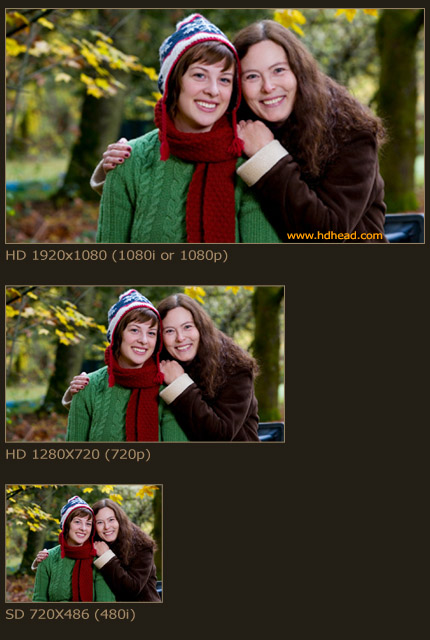
1080 format frame is 5.33 (perceived geometry) or 5.93 (resolving power) times larger than your old North American NTSCSD video.

720 format frame is 2.37 (perceived geometry) or 2.63 (resolving power) times larger than SD.

Imagine 6 TVs stacked in two rows of three TVs. That’s roughly how much 1080 format is larger than SD [Fig. 1].


SD and HD frame sizes

Fig. 1. HD and SD Frame Size Comparison

HD Standards


So many standards confusing you? There are only three in use in the U.S. that you need to know.


For each standard you always wanted to ask about there are probably three others you have never heard of.

HDTVis not entirely new. There was a working system in Japan back in the late seventies. The analog standard was prohibitively expensive to consumers and it did not catch on in spite of outstanding image quality.

In 1996 President Clinton signed the Telecommunications Act of 1996 into law. This law created room for Advanced Television Standards Committee (ATSC) to create a new digital standard governing TV broadcasting in the U.S.

ATSC proposed a myriad of standards. There are only three HD standards that are worth considering at this time:

standard pixel dimensions frames-per-second

1080 23.98p 1920×1080 23.98

1080 59.94i 1920×1080 29.97

720 59.94p 1280×720 59.94

These three standards have been currently accepted by major equipment manufacturers. There is a fourth format rapidly gaining inroads in video cameras but at the moment no VTR supports 720 23.98p recording.

U.S. broadcasters have adopted only 1080 59.94i and 720 59.94p. This means that whatever you shoot will be broadcast in one of these formats. 1080 23.98p is solely an acquisition and post production mastering format at this time. The benefits of 1080 23.98p are discussed in more detail here.

There are also standards proposed by European Broadcasting Union (EBU) such as 1080 25p.

Which standard to choose for your production? Find out here.

HD Standards Comparison Table

Pick a number.


Name Pixel Dimensions Interlaced fps Progressive fps
720 1280×720 n/a 23.976p, 24p, 25p, 29.97p, 30p, 59.94p, 60p
1080 1920×1080 50i, 59.94i, 60i 23.976p, 24p, 25p, 29.97p, 30p

Note: 23.976p is commonly rounded to 23.98p for clarity. “Interlaced fps” is commonly expressed in fields. 50i is really 25fps. Not all the above frame rates are supported by equipment manufacturers.

HD SDI, What is It?

A professional grade digital HD interface.

HD SDI stands for High Definition Serial Digital Interface. This type of connection is found on higher end VTRs, monitors, NLE capture cards and other equipment.

It is capable of carrying uncompressed HD video. Depending on the implementation it may also carry several embedded audio tracks and ancillary information.

What is DTV?

Digital Television.

DTV is a set of digital television standards set forth by ATSC and bound to replace NTSC in the United States no later than February 17, 2009. On this date broadcasters are required by a federal legislation to cease analog TV signal broadcast.

DTV has certain advantages over NTSC. It uses less bandwidth per channel than NTSC requiring a narrower spectrum of radio frequencies. It allows for multichannel sound, electronic program guides, interactivity and other amenities.

In practical implementation DTV is compressed using lossy MPEG-2 codec sometimes resulting in picture artifacts.

HDTV is a subset of DTV standards. DTV is not necessarily in high definition but it defines a number of HD standards proposed for use in the U.S.

Black Burst

Synchronizing signal for SD equipment.

Black burst is the signal which provides heartbeat to standard definition equipment. The purpose of the signal is to synchronize various pieces of video and audio gear so they may work in concert with each other.

Black burst is a PAL or NTSC signal containing black picture. The actual picture content is of no consequence but black is typically used as means of providing neutral content. It is generated by a sync generator and distributed to various pieces of equipment throughout the facility.

In certain situations it is possible to use the black burst in place of tri-level sync for HD applications.

Aspect Ratios

1.78 for HD, 1.33 for SD.

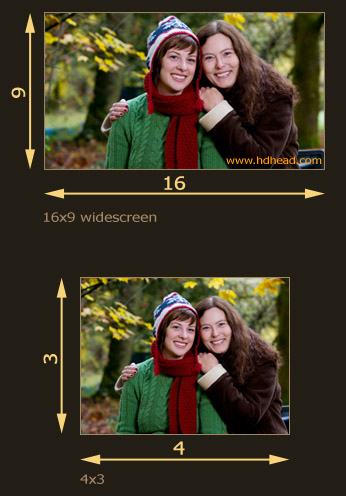
Aspect ratio is the quotient of screen’s width and screen’s height. For example, a standard definition frame is 4 units wide and 3 units tall which is 4:3=1.33. Aspect ratio for SD is commonly expressed as either 1.33, 4×3 or 4:3.

The HD screen is wider. It is 16 units wide and 9 units tall which is: 16:9=1.78. You will see any of these: 1.78, 16×9 or 16:9. Sometimes you may run into 1.77 which is practically the same as 1.78.

The difference in aspect ratios between HD and SD requires you to specify the target aspect ratio when creating SD downconversions.


1.78 vs. 1.33

Fig.1. High Definition and Standard Definition Aspect Ratios

23.98PsF

You hardly need to concern yourself with Progressive Segmented Frame.

You may have seen master tapes from post production facilities labeled with 1080 23.98PsF or 1080PsF instead of “23.98p.” For practical purposes this designation does not change a thing. If a network requires a 23.98p delivery (they may erroneously call it “24p”) what they really mean is a 23.98PsF tape.

Progressive segmented frame was developed to be compatible with legacy video electronics which are not designed for use with progressive signal. PsF also reduces apparent flicker at 23.98fps which is a low frame rate.